
INSTRUCTIONHow Marketplace Works
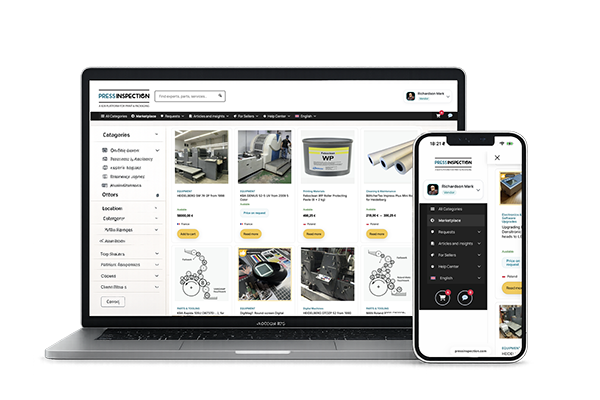
The Marketplace is designed for buyers and sellers in the printing industry who want to trade ready-to-order products and services through one professional platform.
Unlike the Requests section, which is built for custom or open-ended cases, the Marketplace is intended for offers that are already defined by the seller and can be reviewed, compared, and ordered directly.
The platform supports a wide range of business models, including physical goods, services, digital products, and specialist print-related work.
For Buyers
1. Browse ready offers
In the Marketplace, you can explore ready listings created by vendors from different areas of the printing industry.
These may include:
-
physical goods, such as new or used equipment, spare parts, upgrade kits, tools, or components
-
services, such as on-site engineering support, dismantling, installation, inspections, remote assistance, or consultations
-
digital products, such as courses, guides, manuals, training materials, or other virtual resources
-
custom-made physical products, such as hot foil stamping dies, cutting dies, or other made-to-order items
-
restoration and rebuilding services, such as roller recovering or other refurbishment work
-
creative and publishing services, including graphic design, packaging design, prepress support, and freelance work for the printing sector
This gives buyers access to both ready products and specialized professional services in one place.
2. Review the listing
Each listing is created by the seller and may contain:
-
description
-
images
-
scope of service or product details
-
delivery or service information
-
price or request-for-price workflow
-
seller profile
-
booking options, where applicable
This helps you evaluate the offer before placing an order or contacting the vendor.
3. Buy directly or request details
Depending on the type of listing, you may be able to:
-
purchase immediately
-
request a private price offer
-
discuss details with the seller in chat
-
book a service time in the calendar
Some listings have a fixed visible price, while others may use a more flexible offer-based workflow.
4. Book services in the calendar
For selected services, the platform includes a booking module.
This means a buyer can book a service appointment directly by selecting a suitable date and time in the calendar.
This is especially useful for:
-
mechanic visits
-
engineering support
-
consultations
-
on-site service appointments
-
scheduled technical work
The booking feature allows buyers to reserve a specific time slot instead of exchanging messages just to arrange availability.
5. Use chat for clarification
If needed, buyers can communicate with sellers through private chat to clarify:
-
technical details
-
availability
-
delivery conditions
-
service scope
-
custom adjustments
-
price-related questions for non-standard cases
This is useful when a listing needs some discussion before the final decision.
6. If you cannot find what you need
If the Marketplace does not yet contain the right product, service, or specialist for your case, you can use the Requestssection.
There you can publish an individual request and receive tailored responses from vendors.
So the platform works in two complementary ways:
-
Marketplace for ready offers
-
Requests for individual needs
For Sellers
1. Create your listings
Sellers can publish professional listings for different types of offers, including:
-
on-site services
-
remote services
-
consultations
-
digital products
-
custom-made products
-
machine parts and components
-
upgrade kits
-
used equipment
-
new equipment
-
dismantling and installation services
-
refurbishment and rebuilding services
-
graphic design and publishing-related work
This gives sellers flexibility to present both standard and specialized offers.
2. Sell services and products in different formats
The Marketplace is not limited to ordinary physical products.
A seller can offer:
-
remote services, such as consultations or technical support
-
on-site services, such as repairs, installation, dismantling, or maintenance
-
digital products, such as courses, guides, instructions, or downloadable materials
-
made-to-order products, such as custom dies or print-related manufactured items
-
restoration work, such as roller recovering or rebuilding specific mechanisms
-
equipment and upgrade solutions, including both new and used machines or retrofit kits
-
creative work, such as graphic design or publishing services for print businesses
This makes the Marketplace suitable for both industrial vendors and freelance specialists.
3. Receive bookings
If your service is bookable, the platform lets buyers reserve a time directly in the calendar.
This is especially useful for sellers who provide:
-
field service
-
technical visits
-
scheduled maintenance
-
consultations
-
engineering support
The booking module helps reduce manual coordination and makes your service easier to purchase.
4. See your real earnings clearly
When creating or managing your offer, the seller can immediately see the amount they will receive after the platform commission.
This makes pricing more transparent and helps vendors understand their expected revenue before the order is completed.
5. Use chat and private offers when needed
In some cases, a standard listing may still require direct discussion with the buyer.
The platform allows sellers to:
-
answer buyer questions in chat
-
send private offers when needed
-
handle hidden-price situations more professionally
-
move the buyer toward payment after agreement
This is particularly useful for complex technical cases or offers that depend on details.
6. Promote your business
The platform also includes dedicated opportunities for vendors who want stronger visibility.
Inside the FOR VENDORS area, sellers can order special services to improve their presence on the platform.
These may include:
-
help with preparing professional product cards
-
promotional placement
-
product highlighting
-
advertising options
-
blog publication opportunities
-
additional visibility for services or brand content
This is especially useful for sellers who do not yet have strong product materials or want extra exposure.
Marketplace + Requests: how they work together
The platform is built around two connected workflows.
Marketplace
Use the Marketplace when:
-
the offer already exists
-
the seller has prepared a listing
-
the buyer wants to browse and compare ready options
-
the service or product can be ordered directly or booked
Requests
Use Requests when:
-
the buyer cannot find the right specialist
-
the product is unusual or hard to define
-
the task is custom
-
the case needs tailored proposals from vendors
This means buyers are never limited to existing listings only.
If the right solution is not available in the Marketplace, they can publish an individual request in Requests.
In short
The Marketplace allows buyers to find and order ready products and services, including:
-
physical goods
-
digital products
-
remote services
-
on-site services
-
consultations
-
made-to-order industrial products
-
restoration and rebuilding work
-
equipment sales and upgrades
-
design and publishing services
For sellers, it provides a structured way to present offers, receive bookings, communicate with buyers, and see net earnings after commission.
If a ready listing is not enough, the buyer can always continue through Requests for a more individual solution.
PROVISION OF SERVICES

Operated by Kartonika Ltd. (European Union) and its affiliate companies.
Secure Payments

© 2026 PressInspection™ All Rights Reserved.
© 2026 PressInspection™ All Rights Reserved.