
INSTRUCTIONHow Requests Work
The Requests section is designed for buyers who need a custom solution, service, part, inspection, repair, or professional help that is not available as a standard product listing.
Instead of buying a fixed product, you create a request, describe what you need, and receive tailored offers from qualified vendors.
1. Create your request
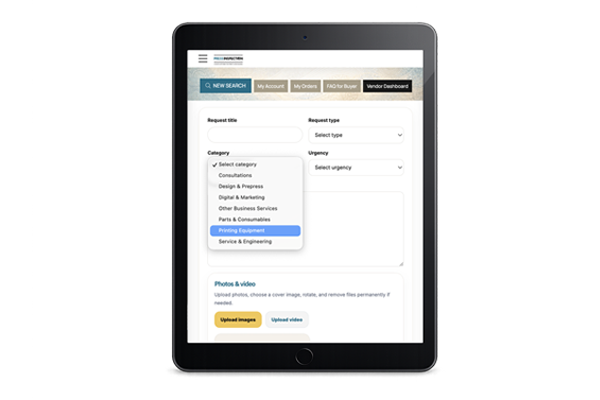
Start by submitting a request with the key details of your case, such as:
-
category
-
request type
-
service mode
-
urgency
-
brand
-
location
-
description of your task or problem
Your request is then published inside the Requests system so suitable vendors can review it.
2. Vendors respond privately
Interested vendors can reply to your request through a private chat.
This allows both sides to discuss the scope of work, timing, questions, technical details, and commercial terms before any payment is made.
Each request may generate separate private conversations with different vendors, so you can compare replies and choose the best option.
3. Receive a custom offer
When a vendor is ready, they can send you a Private Offer directly in the chat.
The offer may include:
-
service or solution description
-
total price
-
payment terms
-
validity period
-
notes or conditions
-
staged payment structure, if needed
You can review the offer directly inside the conversation.
4. Accept or decline the offer
As a buyer, you can:
-
Accept the offer and proceed to payment
-
Decline the offer
-
continue discussing the details in chat before making a decision
This gives you flexibility before committing to the transaction.
5. Full or split payments
Depending on the vendor’s conditions, an offer may use one of two payment models:
Full payment
You pay the full amount in one step.
Split payment
The vendor may divide the total into stages, for example:
-
20% now and 80% later
-
30% / 50% / 20%
-
another custom structure agreed in advance
This is useful for repairs, custom work, sourcing projects, inspections, or services that require an advance payment before completion.
Each payment stage is shown clearly, so you know what is due now and what may be requested later.
6. Payment and reservation of funds
After you accept an offer, the payment is processed through the platform.
Once the required payment has been received, the vendor is notified that the payment has been secured and that work may begin according to the agreed terms.
7. Completion of the work
When the vendor finishes the work or completes the agreed stage, they can mark the job as completed.
You will then be able to:
-
Confirm completion
-
or Request rework if something still needs correction
This helps protect both sides and keeps the process transparent.
8. Approval period
After the vendor marks the work as complete, you have a limited period to review the result and respond.
During this stage, you can:
-
approve the result
-
ask for rework
-
continue communication in the chat if clarification is needed
9. Keep everything in one place
The Requests system keeps the full process together in one workflow:
-
request
-
private chats
-
custom offers
-
staged payments
-
completion confirmation
-
follow-up actions
This makes it easier to manage custom deals that do not fit a standard “buy now” marketplace model.
10. Best use cases for Requests
Requests are especially useful for:
-
machine inspections
-
service and engineering support
-
emergency technical help
-
repair jobs
-
sourcing hard-to-find parts
-
consultations
-
custom print-related services
-
equipment-related business requests
In short
Requests allow you to:
-
describe what you need
-
receive private offers from vendors
-
discuss details before paying
-
accept or decline offers
-
use full or staged payments
-
confirm completion or request corrections
It is a flexible workflow built for professional, custom, and service-based transactions.
PROVISION OF SERVICES

Operated by Kartonika Ltd. (European Union) and its affiliate companies.
Secure Payments

© 2026 PressInspection™ All Rights Reserved.
© 2026 PressInspection™ All Rights Reserved.